

Send Bulk Messages in WhatsApp
WhatsApp offers a powerful channel for small and medium businesses to reach customers—it boasts an impressive ~98% open rate, far higher than email. For e-commerce and service companies, sending bulk WhatsApp messages (legally and effectively) can boost customer engagement. This post explains how to broadcast messages using the free WhatsApp Business app, the official WhatsApp Business API (via solution providers), or CRM-integrated platforms. We include step-by-step instructions, compliance rules (opt-ins and templates), nd industry use cases to help you get started.

Why Bulk WhatsApp Messaging Matters
WhatsApp is one of the world’s most-used messaging apps, with billions of users and extremely high engagement. Customers often open WhatsApp chats almost immediately, making it a reliable way to deliver time-sensitive information. For example, one source notes WhatsApp has a ~98% open rate. That means announcements, promotions, or updates sent via WhatsApp are likely to be seen. Compared to email or SMS, WhatsApp can feel more personal and direct, which helps small businesses stay top-of-mind with customers.
Using bulk messages on WhatsApp can help businesses:
- Share timely updates: Send order confirmations, s hipping notifications, sale alerts, and other announcements to many customers at once.
- Automate notifications: Schedule reminders for appointments, registrations, events, or subscription renewals to relevant groups.
- Enhance customer service: Deliver batch notifications (for example, class-wide school updates or clinic appointment reminders) without spamming individual chats or creating public groups.
WhatsApp Business App: Using Broadcast Lists
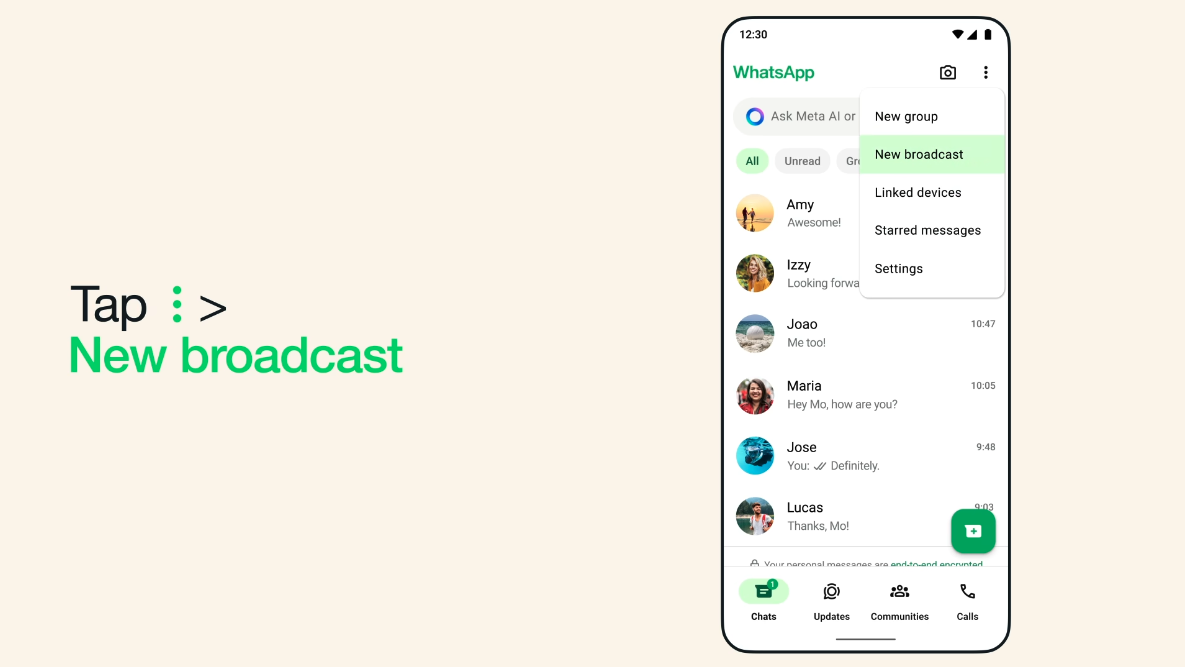
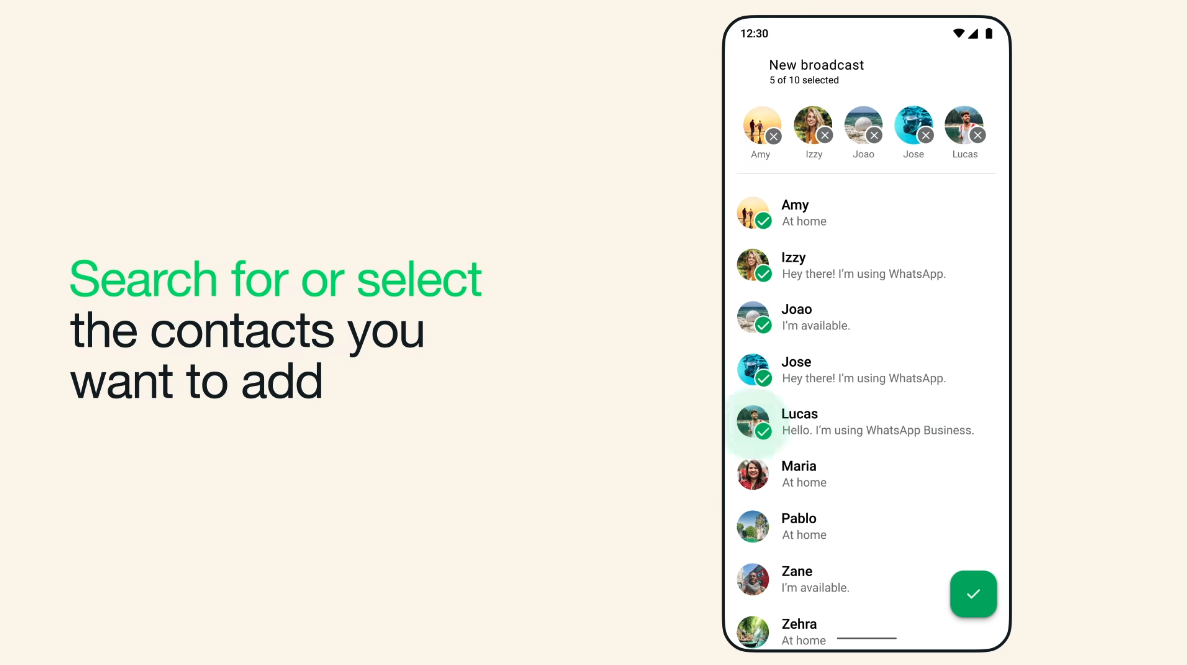
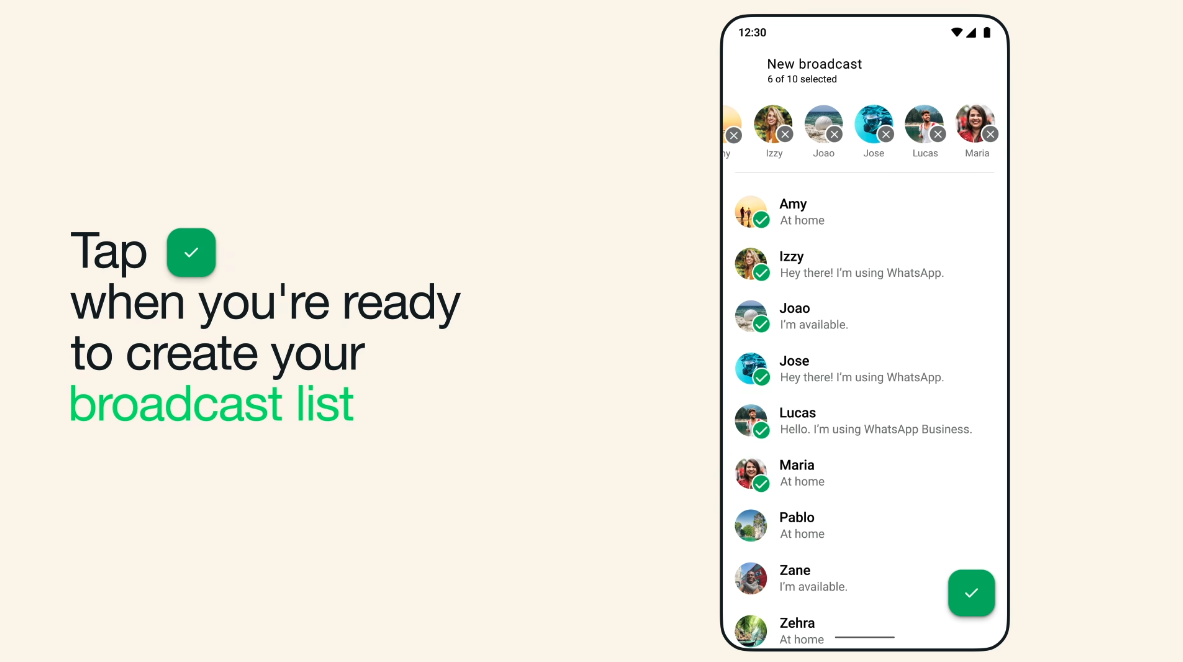
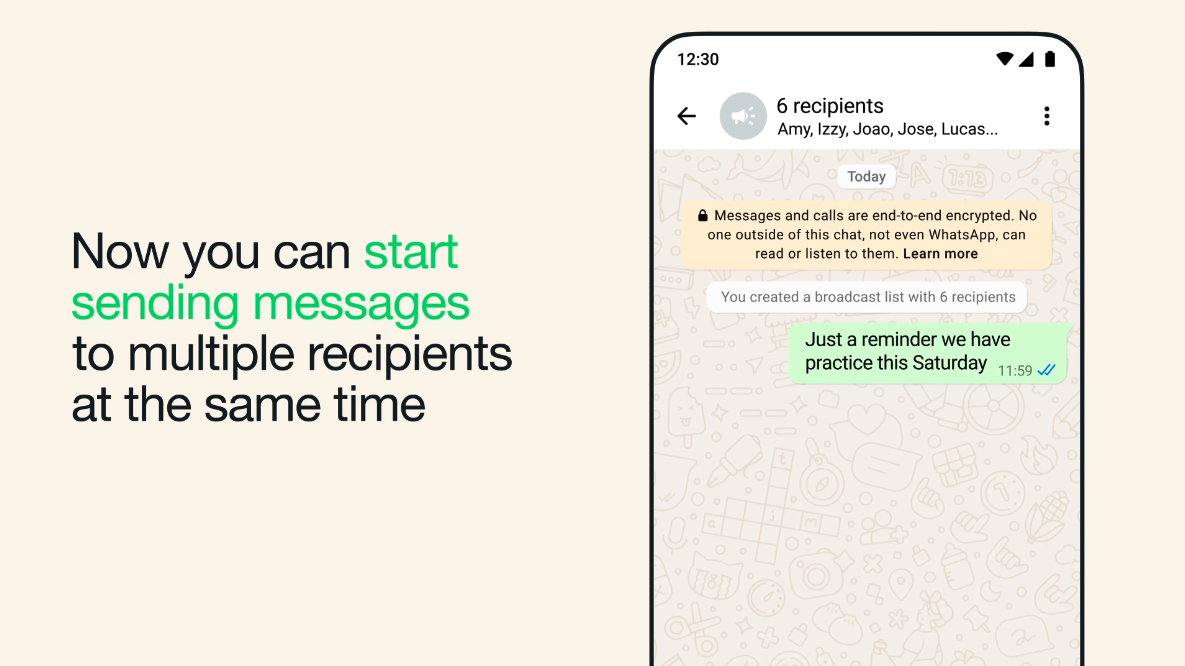
The simplest bulk method is the WhatsApp Business app’s broadcast list feature. Each broadcast list can hold up to 256 contacts, and only people who have saved your number (and opted in) will receive the message. To create a list: on Android tap Chats > Menu (⋮) > New broadcast, pick contacts and confirm; on iPhone go to Settings > Broadcast Lists > New List; on the Web click the menu > New Broadcast. Any message you send will be delivered individually to each recipient. Replies arrive as private chats.
Tips and limitations: Broadcast lists only reach contacts who saved your number, and each list is capped at 256 recipients. For larger audiences or scheduling, use the WhatsApp API or a third-party tool. Always message only people who opted in — sending unsolicited messages violates WhatsApp policy.
WhatsApp Business API: Scaling Up Bulk Messaging
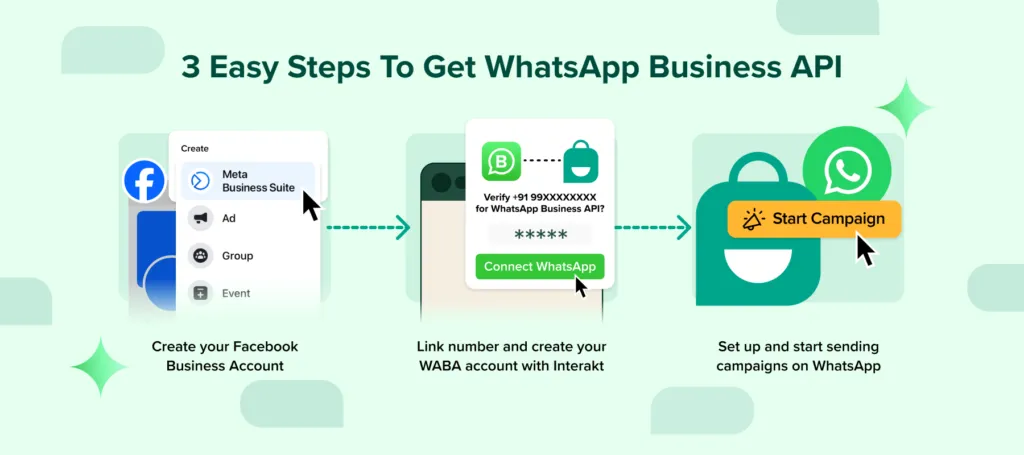
For larger or automated campaigns, use the official WhatsApp Business API. There is no 256-contact limit, but it requires a verified business account and approved message templates. First register your business on Meta’s Business Manager and complete verification. Then pick a solution provider (e.g., Twilio, WATI, Infobip) to provision a WhatsApp number and API access. Create and submit message templates (text or media) to WhatsApp for approval. Once set up, you can send bulk or scheduled campaigns via the API or provider dashboard. Personalize templates with customer details (names, order IDs, etc.) and include images or documents if needed. The API also provides delivery analytics and supports multiple agents. Remember: every recipient must have opted in, and any outreach beyond a 24-hour reply window must use an approved template.
CRM and Third-Party Platforms for Bulk WhatsApp Messaging
Many CRMs and marketing platforms (like HubSpot, Zoho, Salesforce, or specialized tools such as AntCRM) offer WhatsApp integration. This lets you send messages and track conversations from one dashboard. For example, you can link a verified WhatsApp number to your CRM, import your opted-in contacts, and use the CRM’s campaign tools to send approved WhatsApp messages to customer segments. Incoming replies are logged in the CRM for your team to handle. Using a CRM integration can streamline campaigns and customer support, leveraging existing contact data and automation.
Compliance: Opt-In, Templates, and Best Practices
WhatsApp forbids unsolicited messages: you may only contact people who have given you their number and explicitly opted in. Always record how customers opted in (web form, in-store receipt, etc.) and honor opt-outs (if someone blocks or texts “STOP,” stop messaging them). Under WhatsApp’s rules, any message sent more than 24 hours after a user’s last message must use a pre-approved template. Templates are fixed message formats (you insert variables) that WhatsApp approves in advance.
Best practices:Collect clear opt-ins (forms, checkboxes, QR codes, etc.). For bulk or automated outreach beyond 24 hours, use approved templates and personalize them. Segment your audience (by interests or purchase history) and tailor your content. Warm up new numbers gradually (start with ~100–200 messages per day). Monitor delivery and block rates, and adjust if needed. Following these guidelines and maintaining high-quality, relevant content will help keep you in good standing with WhatsApp.

Industry Use Cases
WhatsApp bulk messaging works across industries. For example:
- E-commerce: Broadcast order confirmations, shipping updates, and s ale offers to opted-in customers. If a customer abandons a cart (and has opted in), send a reminder or discount.
- Healthcare: Send appointment or prescription reminders to patients who opted in. Broadcast health tips or new service announcements (e.g. vaccine schedules) to patient lists.
- Education: Notify students and parents about admissions decisions, exam dates, or school events. Schools often maintain class-wise lists for targeted updates.
- Real Estate: Broadcast new property listings, open house invites, or market updates to leads. Agents can send property details via approved templates to interested buyers.
Conclusion
Sending bulk messages on WhatsApp can significantly boost engagement and efficiency for small businesses. Whether you use broadcast lists, the WhatsApp Business API, or a CRM integration, the principles remain the same: get explicit opt-in consent, use approved templates beyond the 24-hour window, and personalize your content. By following these best practices, businesses in retail, healthcare, education, and real estate can reach customers more effectively while staying compliant.

